Livetickr
Comparison

24liveblog alternative: how the two compare.

Looking for an alternative to 24liveblog? 24liveblog is free to start, has been around for years and has a long feature list. Livetickr is a live blog tool with a narrower approach: the feed renders in your own page, sets no cookies and is hosted in Germany.

Your page, not an iframe. Livetickr renders updates into your article. 24liveblog loads them in a frame from its own domain.

A free plan there, no ads here. 24liveblog’s free plan includes sponsored ads. Livetickr starts at €69 per event and shows no ads in the feed on any plan.

More features there, a narrower tool here. 24liveblog has comments, sports templates and desktop apps. Livetickr focuses on the editor and the embed.

The difference

What to look for in a 24liveblog alternative

Both tools put a live blog on your article. These are the three points where they differ most, and where any alternative should have a clear answer.

Frame or page

24liveblog embeds the feed as an iframe from v.24liveblog.com. Livetickr renders the updates directly into your page.

How free is financed

On 24liveblog’s pricing table, “Sponsored Ads Free” is part of the paid plans. Livetickr is paid, from €69 per event, free during the closed beta, and shows no ads in the feed on any plan.

Where it is run from

24liveblog, Inc. is a US company. Livetickr is operated from Germany and hosted in Frankfurt, with no cookies in the embed.

Credit where due

Where 24liveblog is ahead

24liveblog has several things Livetickr does not have yet. If one of them is essential for you, that matters more than anything else on this page.

  • Reader comments and moderated chat
  • Templates for more than ten sports, with live scores
  • Desktop apps for macOS and Windows
  • A public API and SDK
  • AMP support (Enterprise)
  • A free plan you can start on today
At a glance

24liveblog vs Livetickr at a glance

The differences that decide it, side by side, checked against public sources on September 29, 2026. For every tool in one table, see our comparison of live blog tools.

24liveblog compared with Livetickr
Embed24liveblogIframe from v.24liveblog.com, plus a resize script.LivetickrOne script tag. The feed renders into your page, no iframe.
Company24liveblog24liveblog, Inc. Terms governed by US law.Livetickrfdmedia GmbH, Walldorf, Germany. Hosted in Frankfurt.
Cookies in the embed24liveblogCovered by 24liveblog’s privacy policy.LivetickrNone. No stored IP addresses. Readers counted with a hash that changes daily.
Ads in the feed24liveblog“Sponsored Ads Free” only on paid plans.LivetickrNo ads in the feed.
Your branding24liveblogCustom domain and logo on Enterprise only.LivetickrYour brand color, three designs: timeline, markers or editorial list.
Price24liveblogStarter free, 100,000 pageviews. Premium $49 a month ($39 billed yearly). Business $69 ($49 yearly). Enterprise on request.LivetickrEvent: €69 per ticker, one-time. Publisher €199 a month, Network €499; €149 and €399 at the launch price. Excl. VAT, free during the closed beta.
WordPress24liveblogPlugin currently not available on WordPress.org (closed June 2026).LivetickrA WordPress plugin with a block and a shortcode. Elsewhere, the script tag works in any CMS that accepts HTML.
Availability24liveblogSign up and start today.LivetickrClosed beta, access through the waitlist.
In detail

Where the difference matters

A table flattens things. Here is what each row means for a newsroom on the night it counts.

Iframe or your own page

An iframe is a separate page placed inside yours. It brings its own styling, its own scripts and its own domain. That is quick to embed, and it is also why the feed never quite looks like the article around it.

The Livetickr script renders the updates directly into your page. The feed takes the width of the column you paste it into and follows your layout, so it reads as part of the article.

Privacy

24liveblog, Inc. is a US company, and its terms are governed by US law. If your readers are in Europe, it is worth reading its privacy policy alongside your own before you embed it.

The Livetickr embed sets no cookies and stores no IP addresses. Readers are counted with a hash that changes every day. By default, posts embedded from other platforms, such as videos or posts on X, load only after the reader opts in. The service is operated from Germany and hosted in Frankfurt.

Pricing

24liveblog’s Starter plan is free up to 100,000 pageviews a month across the account. Its own FAQ describes what happens after that: you can no longer create events or post, while readers can still view what is there. Ad-free feeds start with Premium, a custom domain and logo with Enterprise.

Livetickr costs €69 per event as a one-time payment, or €199 a month for Publisher with unlimited tickers and 500,000 pageviews (€149 at the launch price). There are no ads in the feed on any plan. During the closed beta, Livetickr is free.

What 24liveblog does well

24liveblog has a long feature list: templates for more than ten sports with live scores, moderated reader comments and chat, polls, apps for iOS, Android, macOS and Windows, and an API. It says it is used by over 70,000 publishers.

Livetickr is younger and narrower. It has a block editor, apps for iOS and Android, scheduled and pinned updates, labels readers can filter by, author cards and anonymous statistics. Readers do not post in a Livetickr feed; that is a choice, not a gap we plan to fill.

Honest fit

Is Livetickr the right 24liveblog alternative for you?

Both tools publish a live feed. They make different trade-offs, and one of them may simply fit you better.

Stay with 24liveblog if

  • you need a free tool today and ads in the feed are acceptable
  • you want reader comments and chat inside the ticker
  • you rely on its sports templates or its desktop apps
  • you cannot wait for a closed beta to open

Choose Livetickr if

  • the feed should render in your page, not in a frame
  • you want no ads in your coverage and your own brand color
  • you want an embed without cookies, run from Germany
  • you want a WordPress block, or one script tag for any other CMS
Switching

Switching from 24liveblog to Livetickr

There is no importer. Your past 24liveblog events stay where they are, and the next event starts in Livetickr.

  1. 01

    Join the waitlist

    Livetickr is in closed beta. Join the list and you get access before the public launch. Subscribe within three months of launch to keep the launch price.

  2. 02

    Set up the next event

    Create a ticker in the dashboard, pick a design and set your brand color. Drafts are free, so you can prepare it days ahead.

  3. 03

    Swap the embed

    Register your domain in the workspace settings, then paste the Livetickr script tag where the 24liveblog code sat. It works in any CMS that accepts HTML.

Questions

24liveblog alternative: common questions

What publishers ask before they move their live coverage.

What is the best 24liveblog alternative?

It depends on what you need. Tickaroo suits large newsrooms that want sports data and CMS integrations. Livetickr suits publishers who want the feed in their own page, no ads and no cookies in the embed. If you need a free plan today, 24liveblog itself is hard to beat.

Is Livetickr free like 24liveblog?

Only during the closed beta. After the launch, Livetickr costs €69 per event, or €199 a month for Publisher (€149 at the launch price), excl. VAT. In return, there are no ads in the feed on any plan.

Does Livetickr use an iframe?

No. The Livetickr script renders the feed directly into your page. 24liveblog embeds its feed as an iframe from its own domain.

Does the Livetickr embed need a cookie banner?

The embed sets no cookies and stores no IP addresses, so the ticker needs no consent banner of its own. By default, posts embedded from other platforms load only after the reader opts in.

Can I import my 24liveblog events?

Not today. There is no importer. Past events can stay where they are, and the next event starts in Livetickr.

Does Livetickr work in WordPress?

Yes. Livetickr has a WordPress plugin: add the Livetickr block, paste the ticker ID, done. Without the plugin, the embed is a single script tag that works in WordPress and any other CMS that accepts HTML.

Why Livetickr

The case for Livetickr

If you are still comparing, these are the four things Livetickr is built around. Each one shows up on the night your live coverage brings in the most readers.

Part of your article

The feed renders into your page, not into a frame. It takes the width of your column and follows your layout, so readers stay in your article.

Seen by every reader

No cookies and no stored IP addresses, so the ticker needs no consent banner of its own. Readers see your coverage without clicking accept first.

No ads, your brand

There are no ads in the feed. Your coverage carries your brand color and design, and author cards credit the editor who wrote each update.

Hosted in Germany

Operated by fdmedia GmbH in Walldorf, hosted in Frankfurt. When your data protection officer asks where reader data goes, the answer is one sentence.

Don’t take a table’s word for it. The demo runs a real Livetickr feed, embedded with the same one-line snippet.See the live demo
Benefits

What you get

The essentials for live coverage, plus the extras that make it nicer to work with.

Embed anywhere in one line of code

WordPress, Next.js, a static page, a landing page for a single event. If it renders HTML, your ticker works there, with the same one-line tag. Paste it yourself in a minute, no developer or rebuild needed.

<script defer
  src="https://cdn.livetickr.io/embed.js"
  id="livetickr-feed"
  data-ticker-id="tkr_9f3ab2"></script>

Always live, no reloads

Publish an update and it shows up in every embedded ticker within seconds. Readers keep reading.

Privacy-first, no cookies

The embed sets no cookies and stores no IP addresses, so live coverage doesn’t drag a consent banner along.

Rich block editor

Text, quotes, images, social and video embeds: structured, not one long text field.

On-brand designs

Choose a timeline, markers or an editorial list, then set it all in your own brand color.

Author cards

Avatar, bio and social links on every post, so the byline credit lands where it belongs.

Schedule ahead

Prepare updates in advance and they publish themselves at the exact minute you set.

How it works

Write, paste, done

Three steps from a blank editor to a live blog on your own page.

STEP 1

Write the update

A clean block editor for text, quotes, images and embeds. Publish now, or schedule it to go live the moment it starts.

STEP 2

Drop in one tag

One <script> tag on any page, any CMS. No plugin, no theme surgery, no developer needed. Paste it once, the embed does the rest.

STEP 3

It updates itself

New posts appear in the embedded ticker on their own, within seconds. Readers stay on the page: no reload, no missed moment.

app.livetickr.io
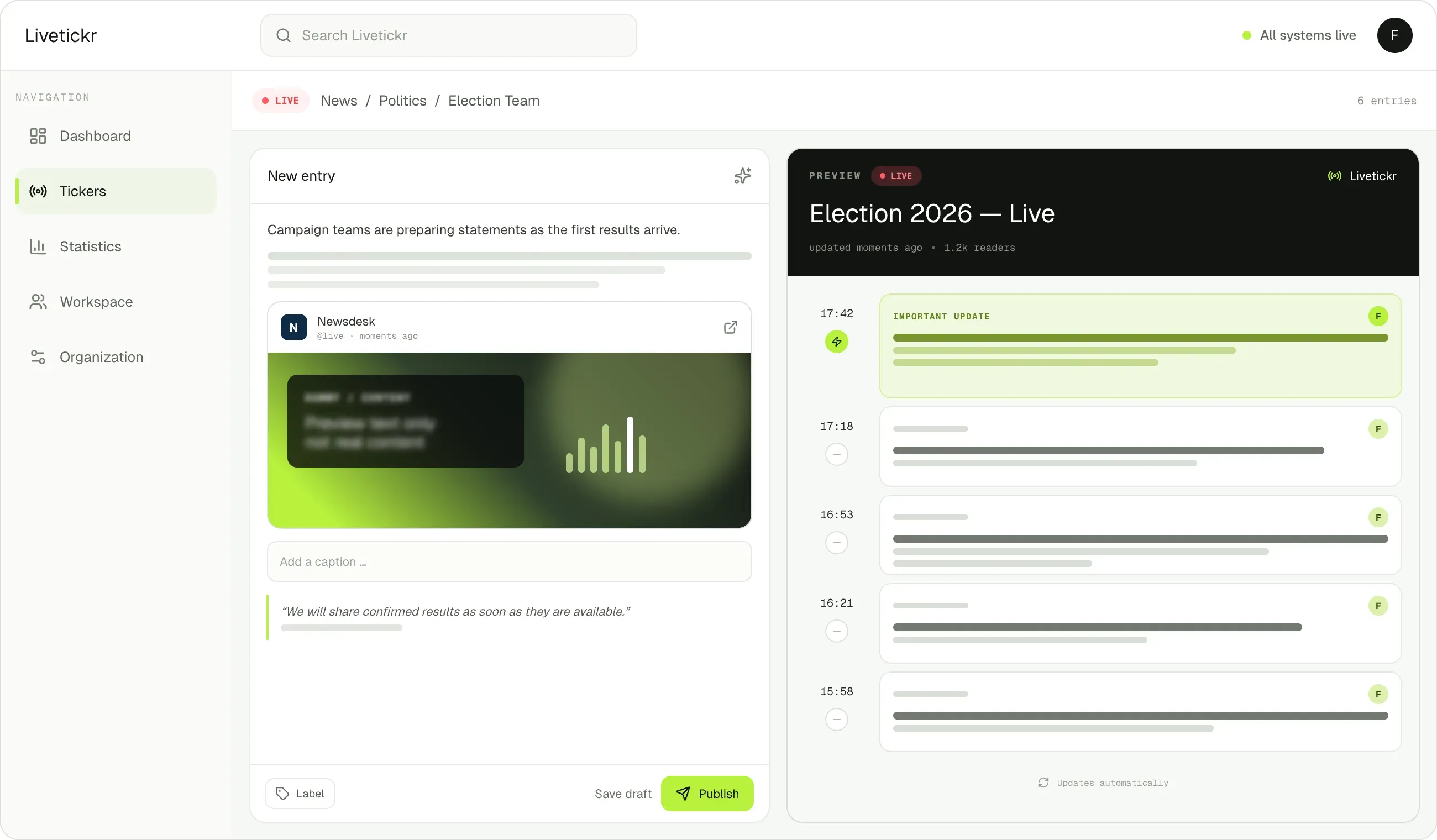
Livetickr dashboard: writing a live update in the block editor.

The Livetickr composer, writing a live update in the block editor.

Livetickr is currently in closed beta

Be first at launch

We’re building Livetickr with a small circle of publishers. Join the list and you get two things:

Early access: you’re in before we open the doors publicly.

Launch price: subscribe to Publisher or Network within three months of launch and keep it for as long as your subscription runs.

Join the waitlist

Join the list and hear the moment we go live.

We’ll email you about the waitlist, the launch and relevant product news. No spam, unsubscribe anytime. You’ll get one confirmation email to opt in.